

TikTok Progress Bar:
Toggling Experience Improvement
This is a mini-case study which I brought up the User Experience of TikTok ‘s Progress Bar from my personal perspective in June 2023.
TikTok is an app that allows people to create, share, and consume short-video content. It is the international version of its Chinese sister app, Douyin, both of which are owned by tech company ByteDance. While Douyin has been available since 2016, TikTok only launched in 2017. Despite its relative newness, TikTok has experienced remarkable growth in recent years. It currently has more than 1 billion active users worldwide and is considered a major landmark in the global social media landscape.
It cannot be denied that the Design of Elements Enhancing Engagement contributes to the key success of TikTok among the young. There are certain points, as a UX designer, I would like to improve for a better experience: lessening irritation and frustration with the least-effort-solution.
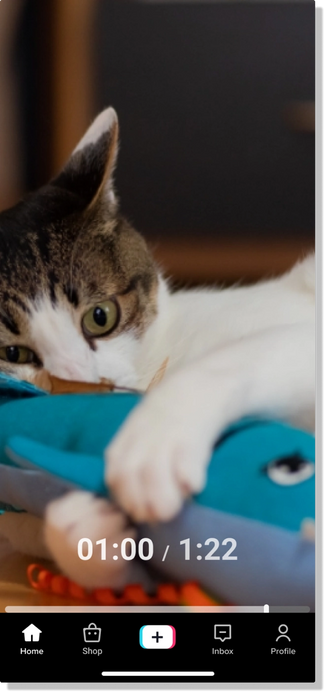
The Progress Bar may overlap with the Tab Bar when toggling the video.
By default, the progress bar is displayed as a continuous line that fills up as the video progresses. Users can toggle through the time stamp to go forward or backward, representing different sections of the video. This allows users to easily navigate through the video and jump to specific sections without the need for manual scrubbing.
Search Field Focus + Tooltips

Search Field Focus + Tooltips

However, the habit of using one hand may lead to an overlap between the toggling action and the button-tapping action.
Toggle Action Overlaps with a certain Button in the Tab Bar

I propose two options as the solution to improve the user experience of toggling the progress bar on TikTok: Redesign the Tab Bar and Redesign the Progress Bar.
-
Redesign the Tab Bar
2. Redesign the Progress Bar

Option 1: Redesign the Tab Bar
By adding the top padding for the layout of the main buttons, the tab bar spares more upper space, hence preventing accidental taps during video toggling.
This option, from the UI perspective, benefits the visual sense as the button position looks more balanced.

Option 2: Redesign the Progress Bar
By adding the top padding for the layout of the main buttons, the tab bar spares more upper space, hence preventing accidental taps during video toggling.

Throughout this assessment, I learned the importance of teamwork. Only by considering the problem from many other perspectives: development, and business, the solution can be implemented and conducted effectively and efficiently.
Schellewald, A. (2023). Understanding the popularity and affordances of TikTok through user experiences. Media, Culture & Society, 45(8), 1568 1582. https://doi.org/10.1177/01634437221144562
TikTok (2021) Thanks a billion! Available at: https://newsroom.tiktok.com/en-us/1-billion-people-on-tiktok (accessed 9 July 2022).
Kale S (2020) How coronavirus helped TikTok find its voice. The Observer, 26 April.
Roose K (2018) TikTok, a Chinese video app, brings the fun back to social media. New York Times, 3 December.
Yunwen Wang, Humor and camera view on mobile short-form video apps influence user experience and technology-adoption intent, an example of TikTok (DouYin), Computers in Human Behavior, Volume 110, 2020, 106373, ISSN 0747-5632,