
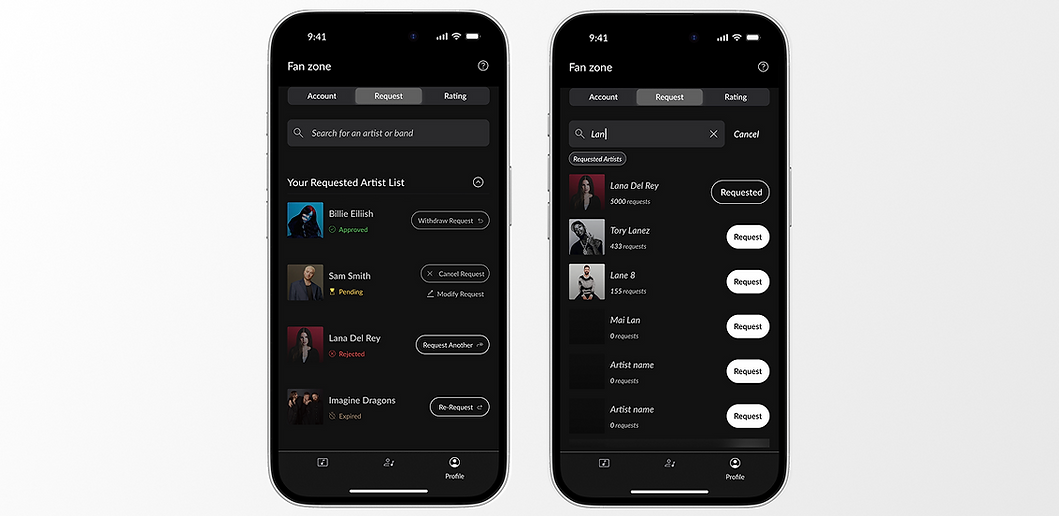
Search Experience as the Trigger to Youbloom’s USP: Request Artist
Company
Youbloom
Role
Research
UX design
UI design
Year
2024
Market
USA, B2C
Streamlined key interactions for clarity and speed, resulting in 40% rise in task success by new users.
Simplified the request journey to reduce friction — leading to a 38% drop in search abandonment.
Fully designed the mobile request flow and successfully handed it off for development
Project Brief
-
Product
Mobile MVP — Search Experience -
Focus Area
End-to-end search-led request flow designed for speed, clarity, and action -
Target User
U.S.-based iPhone users attending live shows — particularly multi-genre or freestyle events -
Objective
Let users quickly search and request their favorite artists, reducing friction and enabling youbloom to validate demand early on
Context
This project marked the first-ever mobile adaptation of youbloom’s core feature — “Request Artist”. The feature already existed on the website, but the mobile app was still in its early stages, with no prior design or experience to build from.
When I joined, youbloom was preparing to roll out its mobile MVP. The business priority was to test demand quickly by activating fan behavior on mobile — without investing in deep upfront research.
We had to move fast to ship a functional, testable version within 1–3 months.
Problem
Solution
Fans dropped off at the very beginning of the request journey — often before even selecting an artist.
A search-led experience with real-time feedback and focused action states to guide fans smoothly through their requests.
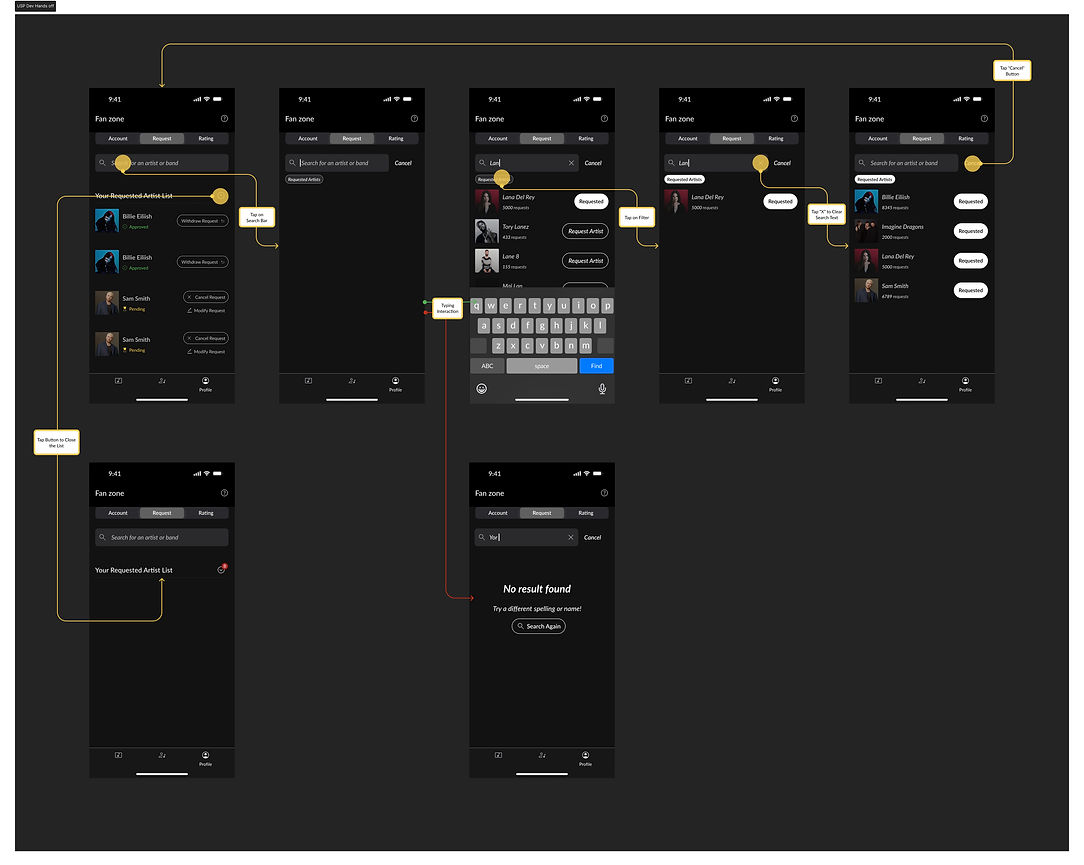
Full Fan Search Experience Dev Hands off
The Problem: Deep Dive
As we transitioned youbloom’s core feature - “Request Artist” — from web to mobile, the challenge wasn’t technical; it was behavioral.
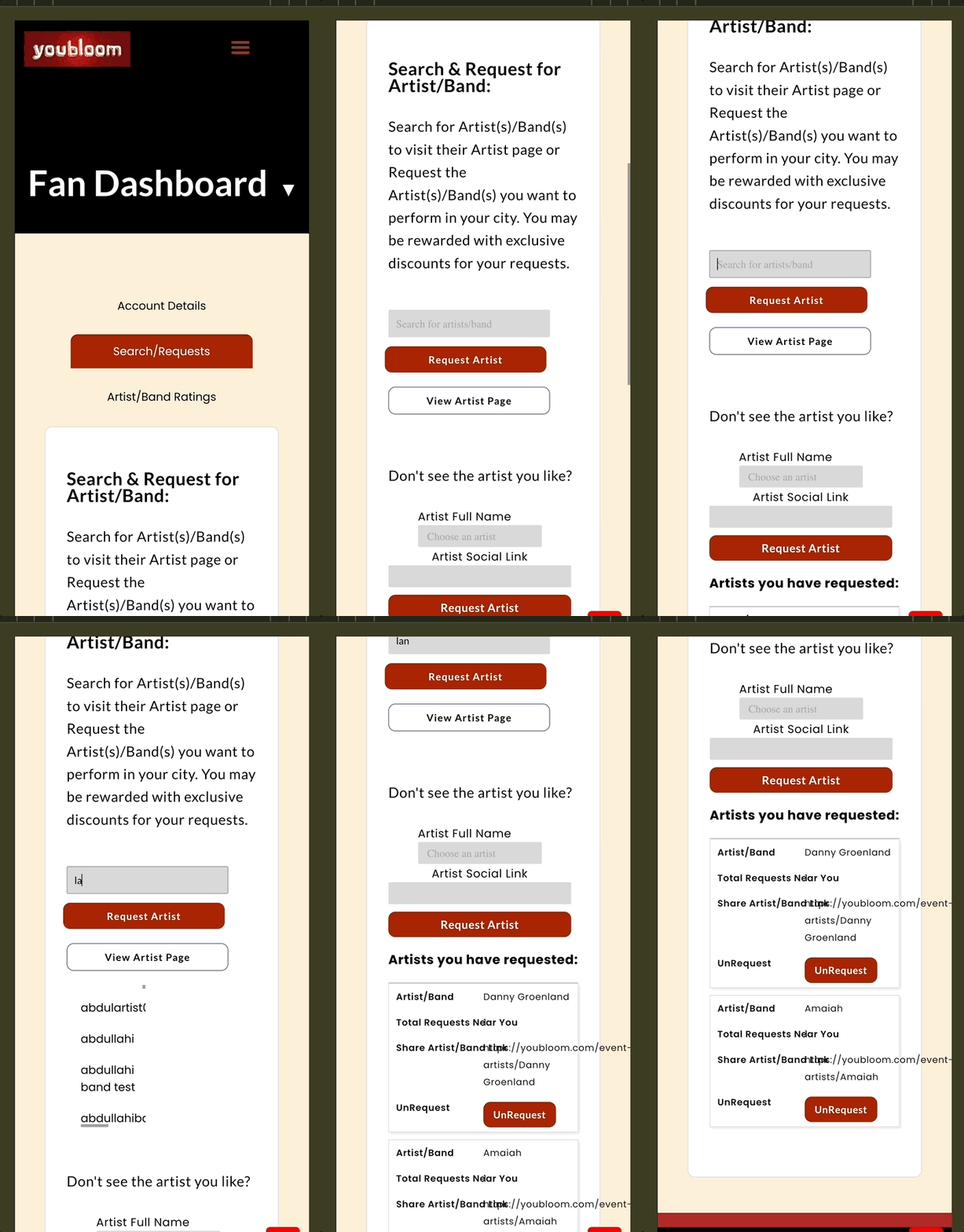
Post onboarding, fans landed in the Fan Profile tab, but the request flow — our core value prop — was buried in the segment "Artist/Band Request". There was no clear guidance or incentive to act, and early drop-off was common.
At this MVP stage, youbloom was in the introduction phase of its product life cycle. The key goal wasn’t just usability — it was about activating behavior. We needed to make it obvious what fans could do, why it mattered, and how to do it fast.
The risk: if users didn’t request an artist in their first session, they likely never would.
Our design goals were clear:
-
Surface the feature early
-
Communicate its value instantly
-
Make action feel intuitive and rewarding
Before & After
To highlight the impact of this Adaptive Design, I’ve outlined the key differences between the original experience and the updated MVP flow - focusing on how we improved visibility, guidance, and fan action around the “Request Artist” feature.
Before
After
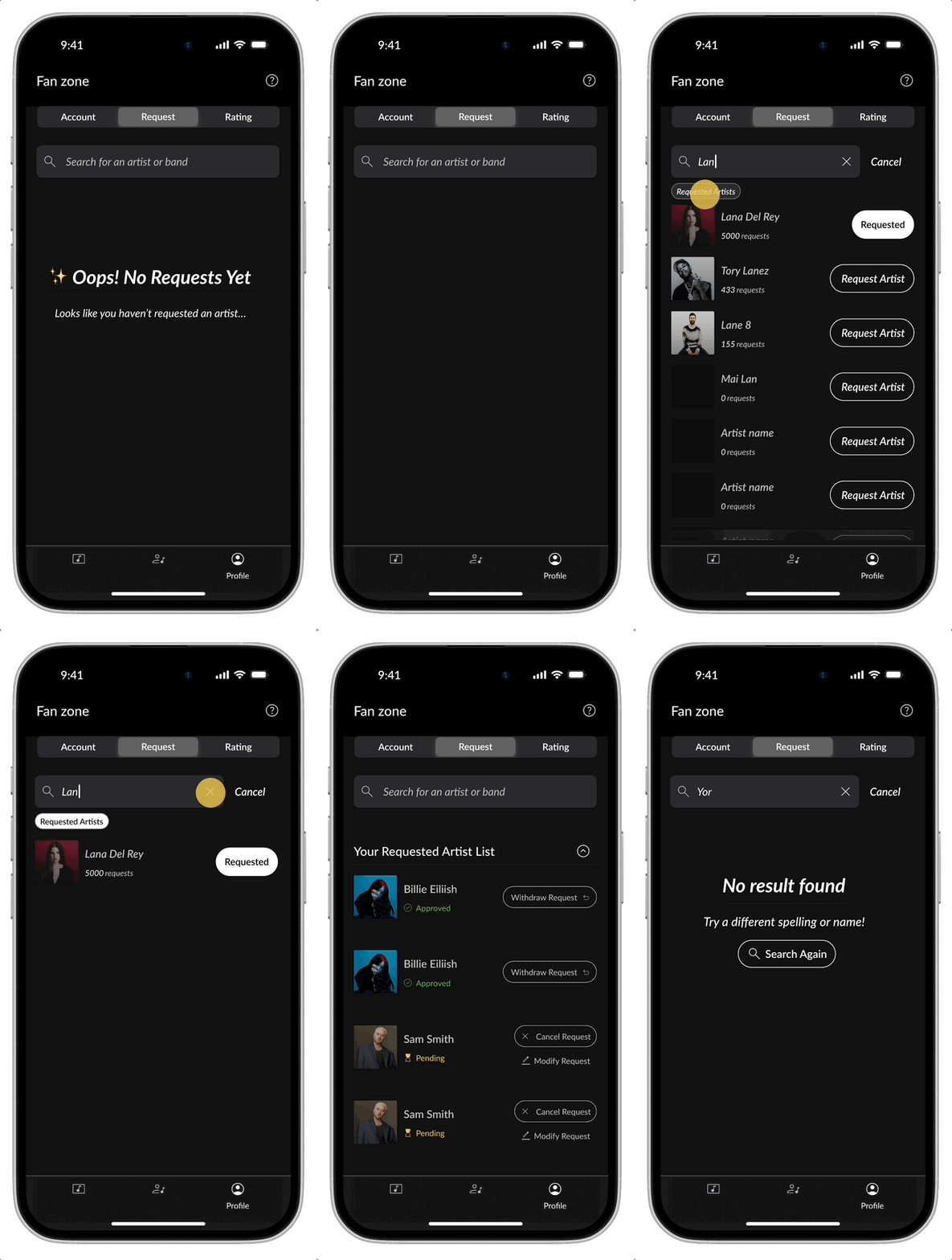
Designing the Core: Search as the Gateway to Fan Action

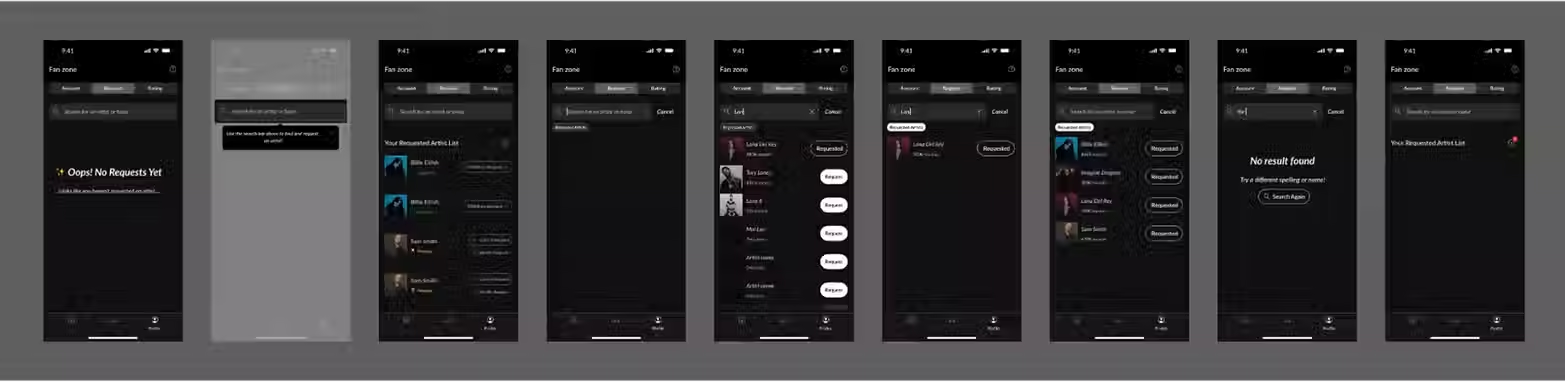
Search Experience Flow leading to Request Artist
To highlight the impact of this Adaptive Design, I’ve outlined the key differences between the original experience and the updated MVP flow - focusing on how we improved visibility, guidance, and fan action around the “Request Artist” feature.

Default Landing in “Request” Segmented Control
I designed the default state to immediately show fans where they were - in the “Request Artist” segment - while also providing a persistent list of previously requested artists. This created a feeling of momentum and familiarity.
This was the first signal that the user could shape what happens next.
Detailed Status (Requested List View)
The drop-downed list provides full context and next actions related to each request, like updates or changes.
-
✅ Approved status - Request has been accepted.
▶︎ “Withdraw Request” CTA - Allows canceling active request. -
🕓 Pending - Still under review.
▶︎ “Modify Request” CTA - Shown alongside pending for edits.
▶︎ “Cancel Request” CTA. -
❌ Rejected - Artist declined or not possible
▶︎ Option to “Request” other artists. -
⌛️Expired - The request is out of time for processing
▶︎ Option to “Request Again”.
→ Designed for decision-making and next steps.

Default Request Screen with Search Bar + Existing Collapsible Requested Artist List
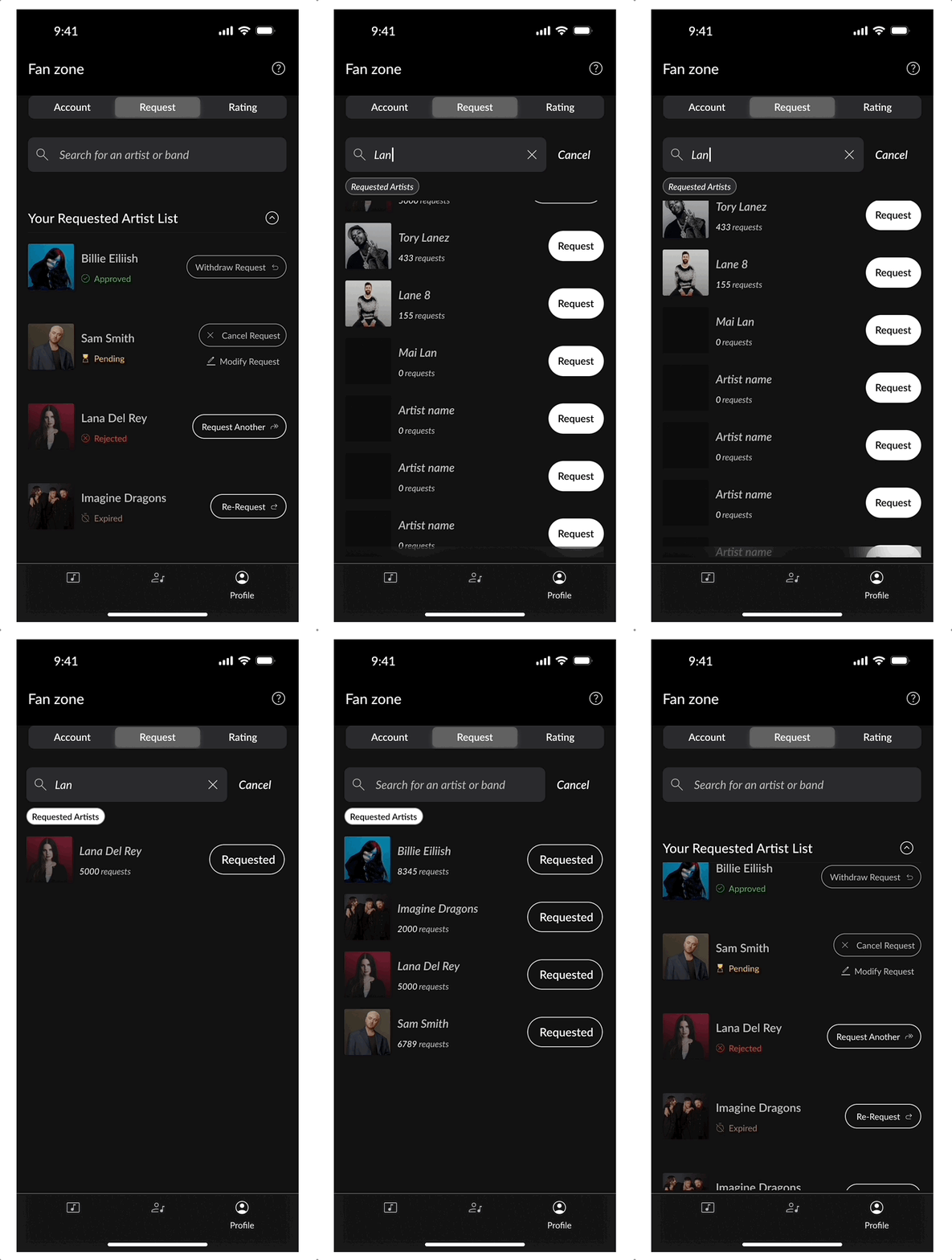
Search Field Focus + Tooltips
When fans tap the search bar, the interface entered a focused state - hiding the previously requested artist list to free up vertical space and bring full attention to the search input and results.
This decision is made to create visual clarity and cognitive focus, helping fans stay engaged without distractions.
For first-time users, tooltips & empty state provide lightweight guidance, reminding them they could request any artist - even ones they weren’t sure about.
This moment is designed to feel clean, responsive, and purpose-driven - nudging fans toward action with minimal friction.
Focused search field with keyboard active, tooltip visible, and previously requested list hidden
Empty state and tooltip for New User
Real-time Results with Request Status, Count and Filter
Shown in: Search result list
Each result surfaces a single primary action:
☑️ “Requested” – This simple label replaces the CTA button when the user already requested that artist. It confirms the action is done.
➕ “Request” – Appears for all other artists and acts as a direct one-tap action.
No other states shown here – The goal is to keep the UI lightweight, fast, and focused on primary action.

Search with mixed results: differentiate Requested & Unrequested Artists
Results include 🔢 request counts (number of requests) as social proof and are ⬇️ sorted by most requested, helping fans decide faster.
❏ A “Requested Artists” filter highlights previously requested artists, helping returning users instantly recognize past actions and avoid duplicates.
If an artist is not available, no result is shown.
Real-time Results with Request Count & Sorted
Request Action in Search
When a fan taps “Request,” the state updates instantly to “Requested.”
This real-time feedback was critical to affirming their action, especially in an MVP context where the experience needed to feel complete, even if minimal.
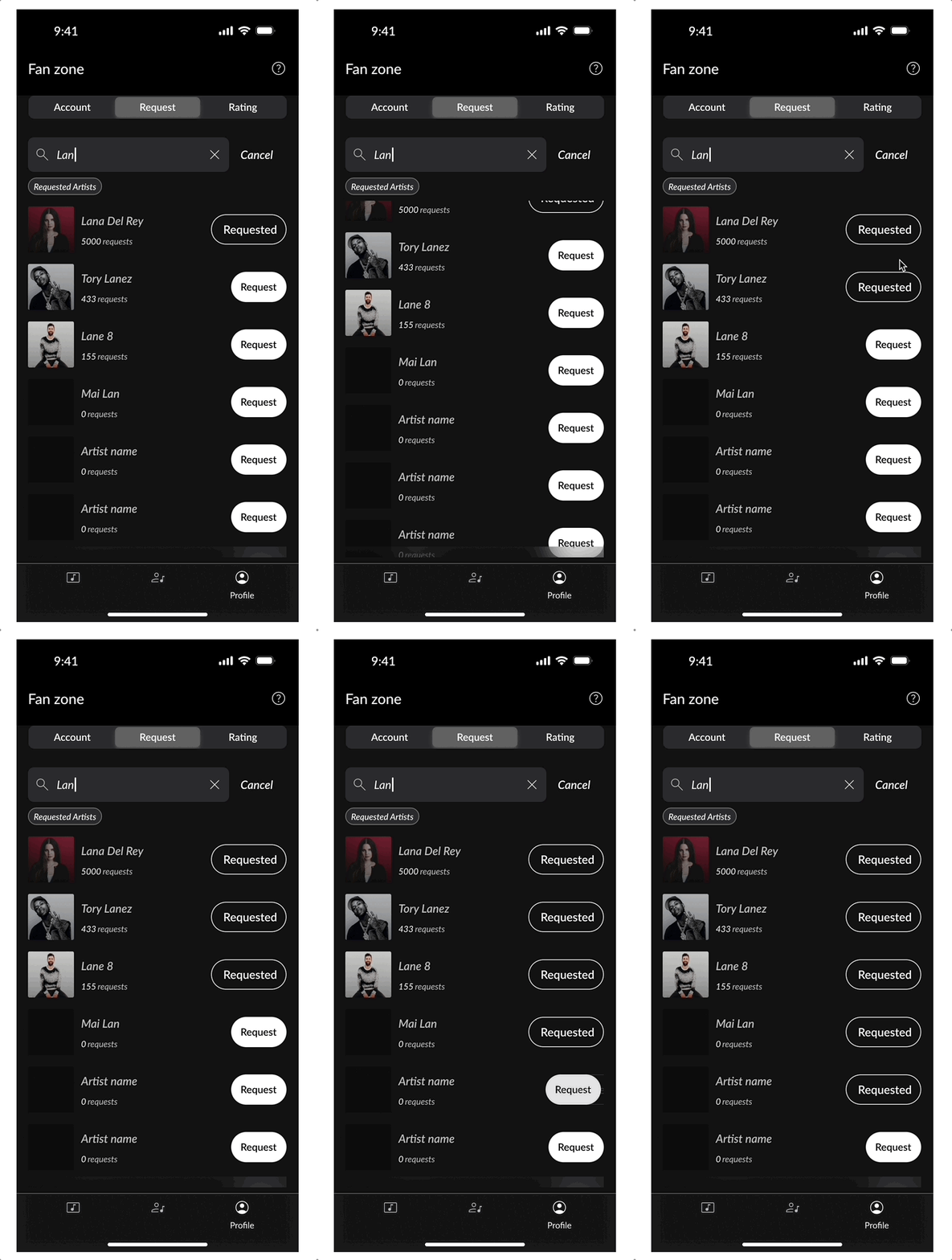
Button changing to “Requested” after Interaction
Other User Behaviors & Interactions
If no results appear, a friendly empty state with retry prompt ensures a smooth, dead-end-free flow.
∅ No Result State + Retry Prompt
No search result with a retry CTA
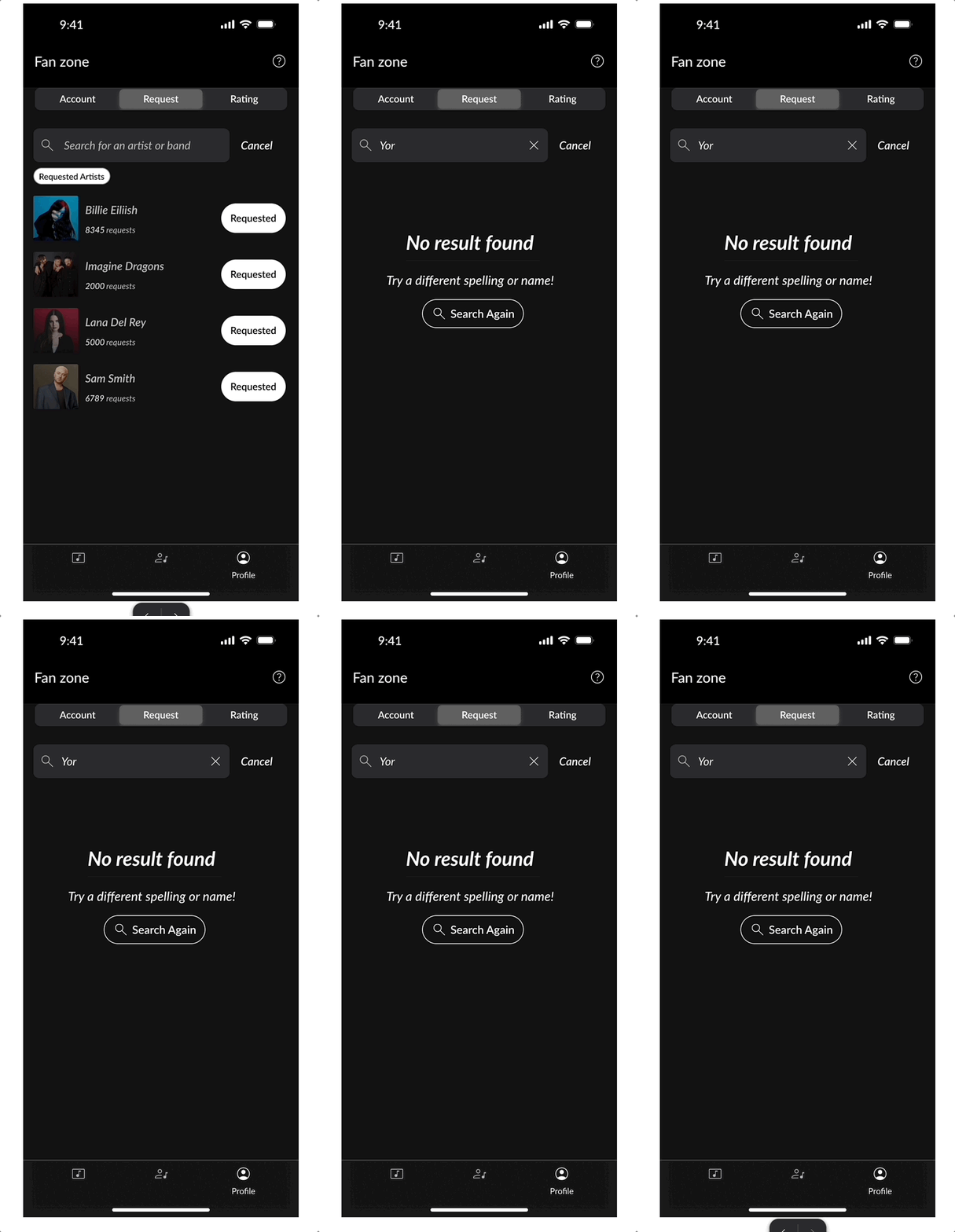
The list auto-expands for a quick glance at recent requests, helping users stay updated. They can manually collapse/expand anytime for flexibility.
Collapsible Requested Artist List
Your Requested Artist List
Final Designs
.avif)
Key Modules & Reusable Component
.avif)
.avif)
❋ TL;DR
Our design strategy prioritized user discovery, clarity of action, and early conversion behavior, aligning with business goals to grow the number of artist requests.
Analytics and past reports revealed a huge number of drop-offs at the very beginning of the request journey. To understand the ‘why,’ we conducted 5 interviews, observing user behavior through video calls and screen-sharing.
New fans are invited to download the mobile app via an email sent from the youbloom website, often after submitting a request online. When they enter the app, any previously created artist requests are shown in a list view, allowing them to pick up where they left off. This design ensures continuity and encourages deeper engagement through familiar, data-driven re-entry.
The final flow - now fully shipped to engineering - delivered measurable impact:
→ 38% Drop in Search Abandonment
→ 40% Rise in Task Success
Two Paths that Lead Users to the Core USP: Request Artist
In the mobile MVP, new fans can reach the “Request” segment of the control via two key entry paths:
-
Post-onboarding guidance
-
Referral reward activation
.avif)
Entry paths to ‘Request Artist’
Reflections & Appreciation
I feel truly blessed to have the opportunity to work remotely with such a diverse team from various countries. This experience not only enriches my perspective but also allows me to collaborate with talented individuals who bring unique insights and ideas to the table.
Diving into the UX implementation for an MVP in the music domain has been an incredible journey. It’s exciting to explore a new area and apply my skills in a way that directly impacts users’ experiences in the world of music.
I’d also like to extend my heartfelt gratitude to Phil Harrington - CEO of youbloom for fostering an environment that encourages us to grow as professionals in UX design and research. Your support and challenges push us to strive for excellence and innovation, and I truly appreciate the trust you place in our team.
Thank you for this amazing opportunity!
These outcomes validated our decision to simplify entry points, structure the request around intent, and prioritize clarity over feature depth in the mobile MVP.

Please Note: As the project is still in progress, not all designs are available for display or discussion at this time.